Skip to content
Billiard hall management software

Run your billiard hall on autopilot.

Everything your hall needs — live table timers, reservations, pricing, checkout, and reports — in one fast, offline desktop app. No spreadsheets, no disputes, no guesswork.

Offline-first desktop app for Windows & macOS

Built specifically for billiard halls

Not a generic point-of-sale tool bent to fit. Sargo is desktop software made for how pool halls actually run — offline, on your own computer.

Perfect forPool hallsBilliard clubsSnooker centersSports bars

Purpose-built

Designed around tables, sessions, and the counter — not retail.

Offline-first

Runs on your PC with no internet needed to operate.

Windows & macOS

Installs as a native desktop app on the computer you have.

Direct support

Licensed and supported directly by AdvancePH.

Why Sargo

Everything you need to run the floor.

The daily work of a billiard hall — tracking time, catching overtime, closing bills, and knowing your numbers — handled in one place, so nothing slips.

Keep every table on track

Live timers run each session automatically, so your whole floor stays under control at a glance.

Get warned before time's up

On-screen and audible alerts fire before a session ends — no surprises for your staff or your guests.

Never lose money to overtime

Open and expired sessions are flagged and billed accurately, down to the last centavo.

See your business clearly

Revenue, hours, and utilization by table, package, and payment method — the moment a session closes.

How it works

Up and running the same day.

No servers to configure and no training marathon. Install it, add your tables, and start your first session.

1

Install & activate

Install on your Windows or macOS computer and enter your license key. From there, Sargo works offline.

2

Set up tables & pricing

Add your tables and create flat-fee or hourly pricing packages, then pin your go-to rates to the floor.

3

Run the floor

Start sessions in one tap, take payments at checkout, and watch today's numbers add up in real time.

Command your floor

Every table, live, at a glance.

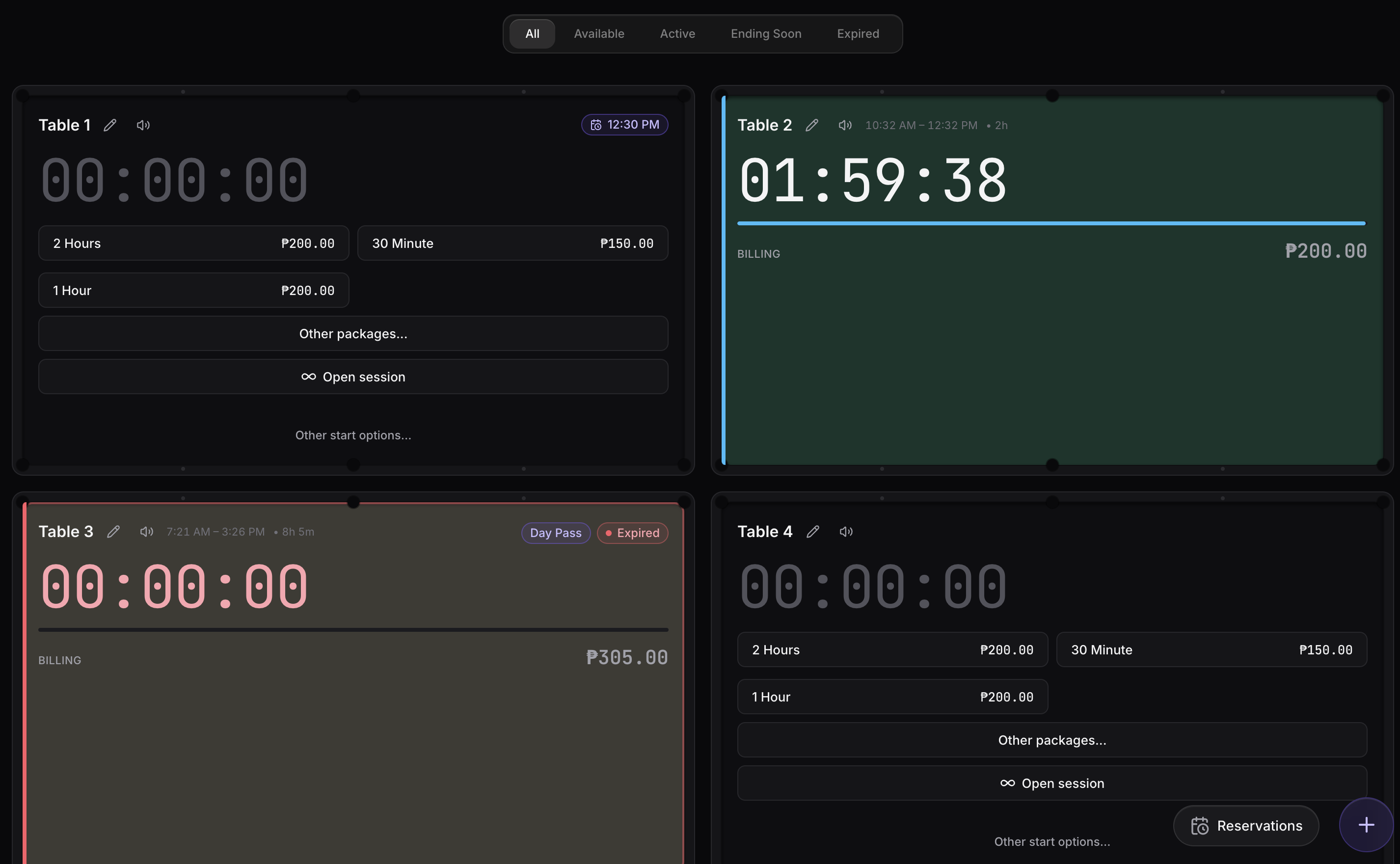
The dashboard is your control room. Each table shows its live timer and status — so anyone at the counter knows instantly what's free, what's running, and what needs attention.

  • Live countdowns

    Real-time timers on every table, styled like the felt they sit on.

  • Clear status at a glance

    Available, Active, Ending Soon, and Expired — color-coded across the whole floor.

  • One-tap start

    Quick-start packages, open time, day passes, or custom sessions in a single tap.

  • Day's numbers up top

    Revenue, sessions, hours, and reservations for today — always in view.

Sargo dashboard showing available, running, and expired table timers across the floor

Smart reservations

Book ahead without the double-booking headaches.

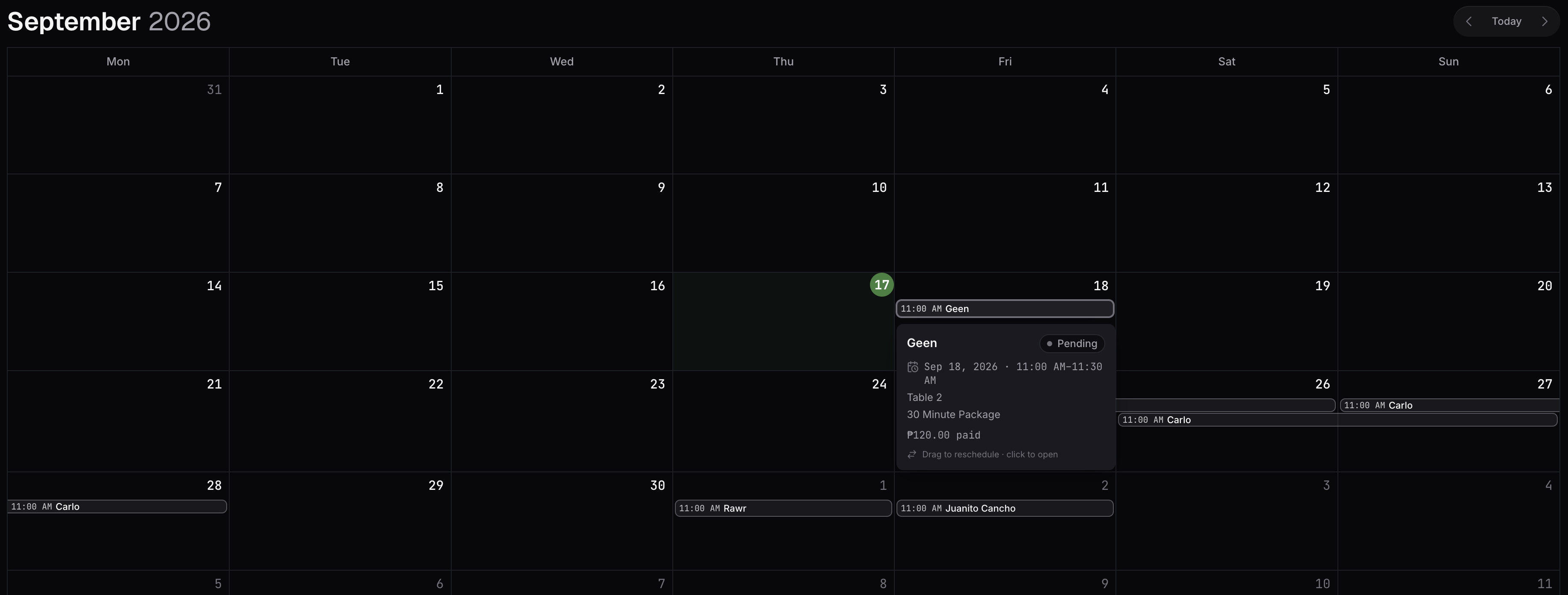
Take bookings by phone or at the counter, hold the right table for the right time, and turn a reservation into a live session with one tap.

  • Conflict prevention

    Overlapping bookings on the same table are blocked automatically.

  • Live arrival tracking

    See who's arriving soon and who's overdue, with live countdowns.

  • Returning guests

    Search past guests to prefill a booking in seconds.

  • Advance payments

    Record a deposit at booking; it carries straight onto the session.

Sargo smart reservation system tracking upcoming bookings with live countdowns

Never miss a beat

Alerts that reach you anywhere in the app.

Sargo warns before a session ends and again when it expires — with on-screen prompts, corner notifications, and audible sounds you can assign per table. Wherever you are in the app, you'll know.

  • On-screen warnings

    Floating prompts at 5 minutes, 1 minute, and on expiry.

  • Audible alerts

    Assign warning and expiry sounds per table — upload your own clips.

  • Corner notifications

    Non-intrusive toasts for every start, extension, payment, and close.

  • Tunable

    Set warning thresholds, volume, and auto-dismiss timing to fit your floor.

Sargo alert system showing on-screen warnings and notifications for a session ending

Know your numbers

Reports that explain your business.

Understand exactly where your revenue comes from — by payment method, package, and table — and how hard each table is working.

  • Revenue you can trust

    Collected revenue attributed by when it was actually paid.

  • Breakdowns that add up

    By payment method, package, table, and billing type.

  • Utilization

    Sessions, hours, and takings per table to spot your best (and idle) tables.

  • Trends

    Period-over-period movement so you know if you're up or down.

Sargo reports page with revenue trends and breakdowns by payment method, package, and table

Flexible pricing

Price the floor exactly how you run it.

Create reusable pricing packages — flat-fee or hourly — and put the ones you use most a single tap away. Schedule happy-hour rates, weekend pricing, or per-table-type rates without touching a spreadsheet.

  • Flat-fee or hourly

    Fixed packages for promos and passes, or metered hourly rates.

  • Availability schedules

    Weekly day/time windows — even overnight — for time-based pricing.

  • Per table type

    Different rates for different table classes, or one rate for all.

  • Quick-start

    Pin your go-to packages to the floor for instant one-tap starts.

Sargo pricing packages page for creating flat-fee and hourly packages

Fast, correct checkout

Close out a table in seconds.

One clear balance, an itemized breakdown, discounts and surcharges when you need them, partial payments, and a printed receipt — all from a single dialog.

  • Clear balance due

    The exact amount owed, front and center.

  • Discounts & comps

    Apply a discount, surcharge, or make it free — all recorded.

  • Partial payments

    Split across methods or collect in stages; the ledger stays exact.

  • Receipts

    Print an 80mm thermal receipt, and reprint later from history.

Sargo checkout dialog showing balance due, itemized breakdown, and payment options
Payments

Take payments your customers already use.

Cash and card come built in, alongside the Philippine e-wallets and banks your guests expect — plus your own custom methods.

E-Wallets

GCash
Maya
GoTyme
Maribank

Bank Transfers

BDO
BPI
Metrobank
PNB
UnionBank
Security Bank

Simple, offline licensing

Activate once. Work offline with confidence.

Enter your license key once to activate Sargo on a computer. It's tied to that device and keeps working offline — no need to stay connected to run your hall.

  • Offline operation

    Keep working without internet inside a 30-day validation window.

  • Device-bound keys

    Each license activates one computer, keeping your license yours.

  • Graceful by design

    If a license lapses, checkout and reports keep working while you sort it out.

  • Free device transfers

    Moving to new hardware? Support transfers your license (up to 2×/year).

Sargo license activation screen where you enter your license key to activate the app
Pricing

Simple, per-device licensing.

Pick the license that fits how you operate. One license covers one computer — and every additional license is half price.

50% off every additional license. Running Sargo on more than one computer? Every license after the first is half price — for the 2nd, 3rd, 4th device and beyond.

Monthly

₱499

per device / month

Lowest upfront cost. Includes updates and support while active.

  • All features included
  • Software updates & critical fixes
  • Technical support while active
  • Cancel anytime
Get Monthly
Most popular

Annual

₱4,999

per device / year

Two months free versus monthly. Best for steady operations.

  • Everything in Monthly
  • ≈2 months free vs. monthly
  • Priority support while active
  • Billed once a year
Get Annual

Lifetime

₱9,999

per device, one-time

Pay once, own it. Lifetime critical fixes; 3 months of support.

  • One-time payment — no renewals
  • Lifetime critical bug fixes
  • 12 months complimentary support
  • Best long-term value
Get Lifetime

Prices are per physical device. Payment via GCash or Maya. Monthly and Annual licenses include updates and support while active; Lifetime includes lifetime critical fixes and 3 months of support. Final pricing for multiple devices is confirmed when you get in touch.

FAQ

Questions, answered.

Everything owners and staff ask before running Sargo on the floor.

Yes. Sargo is offline-first. Timers, reservations, billing, checkout, receipts, and reports all run locally on your computer with no connection required. The internet is only needed briefly to activate your license — after that Sargo keeps working offline within a 30-day validation window.

All of your data lives in a local SQLite database on your own computer — nothing is sent to a cloud server. It stays in place across app updates. Sargo includes built-in backup and one-click restore, plus optional automatic backups, so you can keep safe copies of your data.

Yes. Each license covers one physical computer (device). If you run Sargo on several front desks or branches, each computer needs its own license — and every license after the first is 50% off.

Your license is tied to the hardware it was activated on. If you replace or upgrade a computer, contact support for a free reactivation transfer (up to two per year per license). Reinstalling on the same computer keeps working with the same key.

Sargo records payments at checkout and prints receipts. It ships with Cash and Credit Card plus popular Philippine methods — GCash, Maya, GoTyme, Maribank, BDO, BPI, Metrobank, PNB, UnionBank, and Security Bank — and you can add your own methods with custom logos.

Just a Windows or macOS computer. Receipt printing works with standard 80mm thermal receipt printers. Everything else runs on the computer you already have at the counter.

Yes. Sargo has role-based access. A Super Admin manages accounts and roles, while Staff get day-to-day operations. You control which screens and actions each role can use.

You create Pricing Packages — either a flat fee or an hourly rate — and can scope them to specific table types, add validity dates, and set weekly availability schedules. Start a session with one tap, run open (count-up) time, day passes, or custom durations. All money is tracked to the exact centavo.

Monthly and Annual licenses include updates and technical support while active. Lifetime licenses include lifetime critical bug fixes and three months of complimentary support. Support covers the software itself.

Sargo mascot

Ready to run a tighter, more profitable floor?

See Sargo on your own tables. Request a walkthrough and we'll show you how it fits your hall.

Get in touch

Let's get Sargo on your floor.

Sargo is sold directly by AdvancePH. Reach out and we'll set you up with a demo, pricing for your number of tables, and your license.